Why Your Network Tab Shows http/1.1, h2, and h3
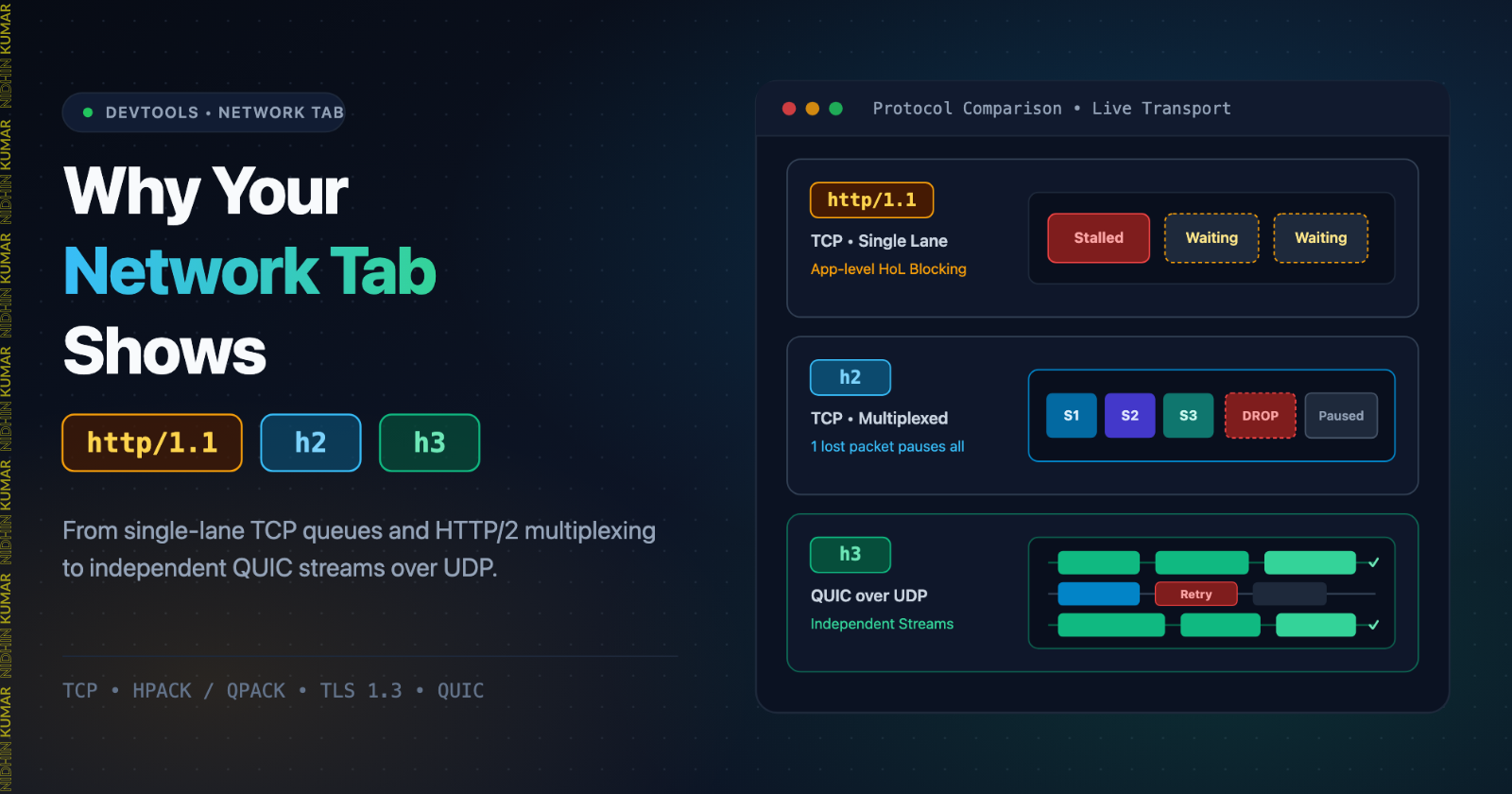
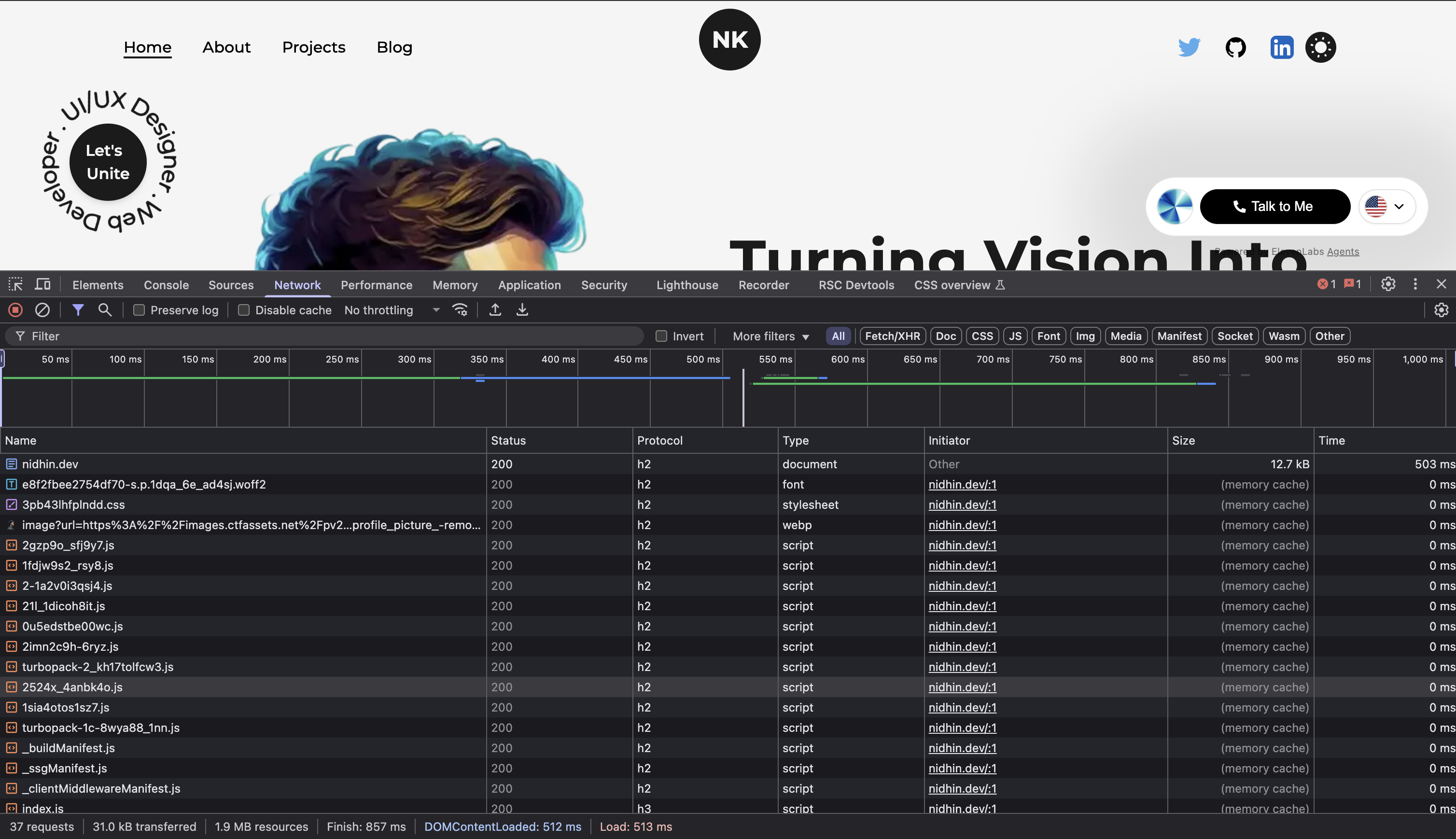
Open your browser's DevTools, head to the Network tab, right-click the table header, and enable the Protocol column. Even on a single page load, you will often spot a mix of http/1.1, h2, and h3 sitting right next to each other.
Here is the surprising part: the HTTP conversation itself barely changes. A GET request, a 200 or 404 status code, caching headers, and JSON payloads mean the exact same thing across all three versions. What changes is how those messages are packaged, multiplexed, and delivered across the network—and how gracefully they handle delays, shaky Wi-Fi, and packet loss.
1. Same Page, Different Protocols
When a modern web page loads, it rarely talks to just one server. Your main HTML and API might come from your primary CDN, while analytics, fonts, or an older payment/support widget come from completely different origins. Because each origin negotiates its own connection with the browser, one page can easily use all three protocols at once.
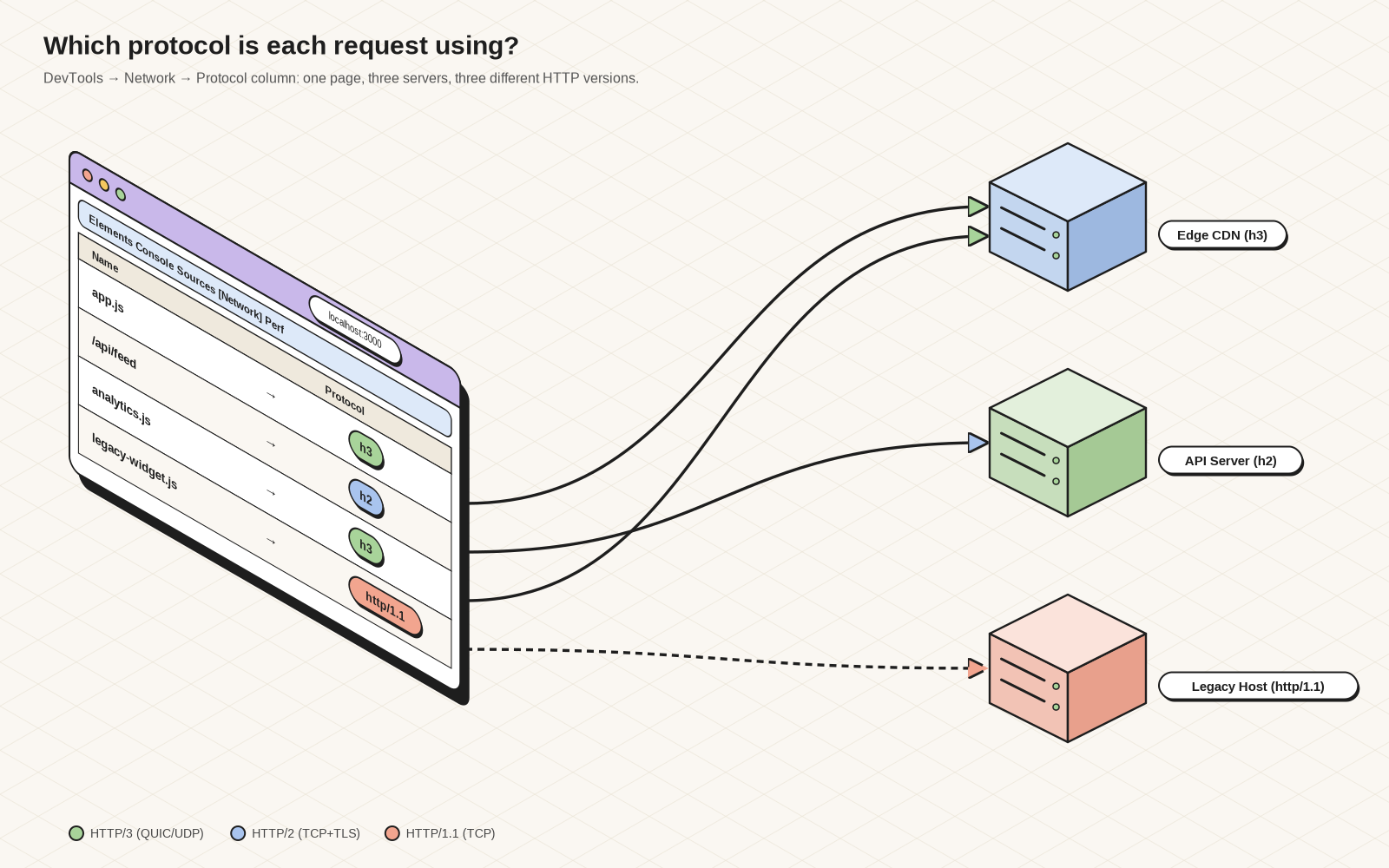
To inspect this yourself, open Chrome/Brave/Edge DevTools (Cmd + Option + I or Ctrl + Shift + I), go to Network, reload the page, and toggle Protocol in the column headers. You can also check from the terminal using curl:
curl -I --http1.1 https://example.com
curl -I --http2 https://example.com
curl -I --http3 https://example.com
2. HTTP/1.1 (http/1.1): The Single-Lane Queue
HTTP/1.1 (standardized in the late 1990s and updated in RFC 9112) runs over TCP and introduced persistent (Keep-Alive) connections so browsers wouldn't have to open a brand-new TCP connection for every single file.
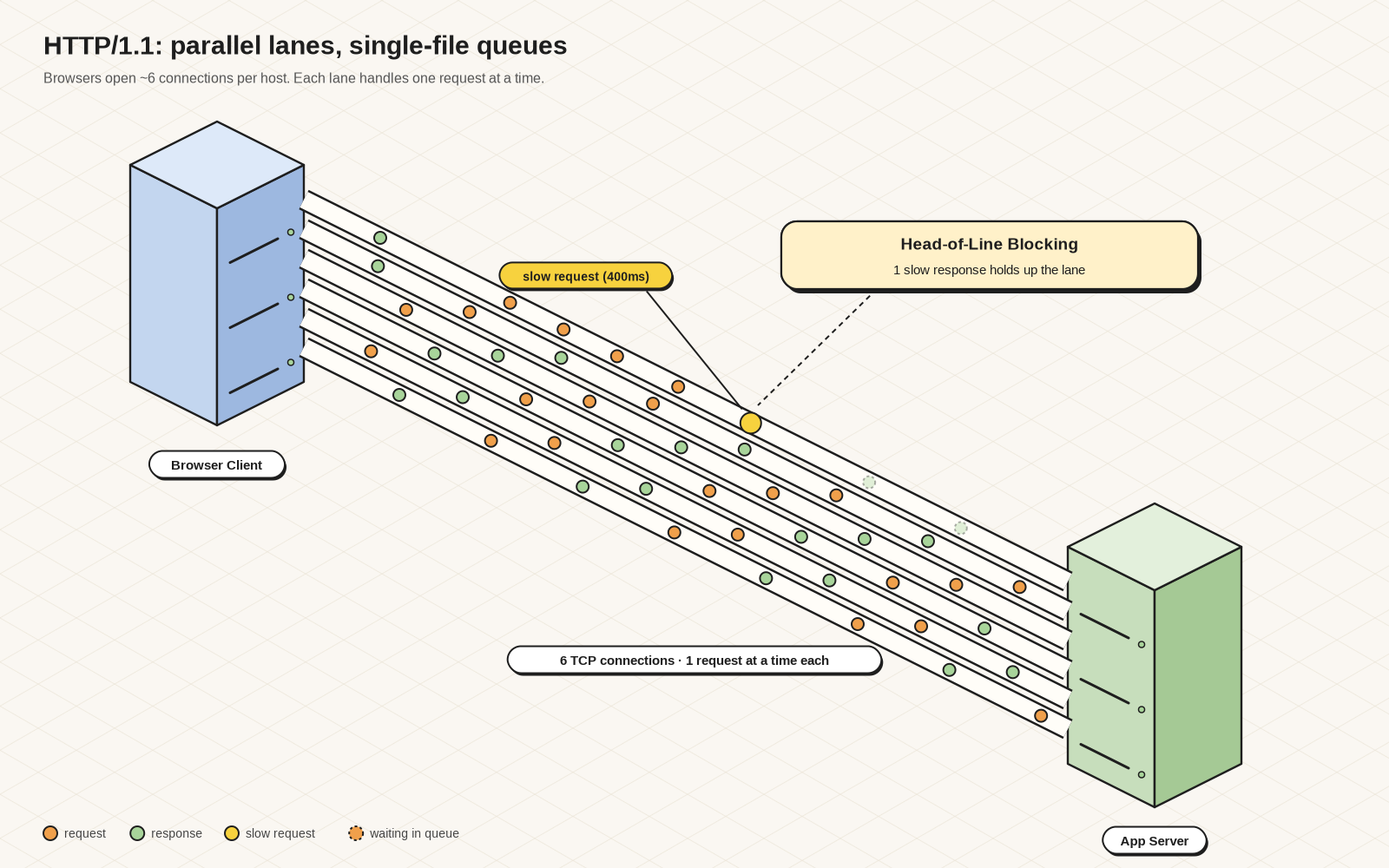
- The bottleneck: On a single TCP connection, HTTP/1.1 processes requests sequentially. If one request takes 400 ms on the server, every request queued behind it on that connection waits—a problem known as application-level head-of-line (HoL) blocking.
- The browser workaround: To load modern pages faster, browsers open roughly 6 parallel TCP connections per origin. That gives you 6 lanes instead of 1, at the cost of extra TCP + TLS handshakes and connection overhead.
- Plain-text headers: Every request sends full text headers (
Cookie,User-Agent,Authorization) repeatedly, adding extra bytes on chatty apps.
Real-World Example
Imagine a page requesting 18 small assets from an older on-prem service over http/1.1. The browser spins up 6 TCP connections and distributes the requests across them. If /slow-config stalls for 500 ms on connection #2, the two scripts queued behind it on connection #2 sit idle waiting for their turn—even though the server has plenty of CPU left.
3. HTTP/2 (h2): One Connection, Many Streams—Until a Packet Drops
HTTP/2 (RFC 9113) kept TCP underneath so the internet wouldn't have to replace its transport layer overnight, but completely redesigned how HTTP frames data on the wire:
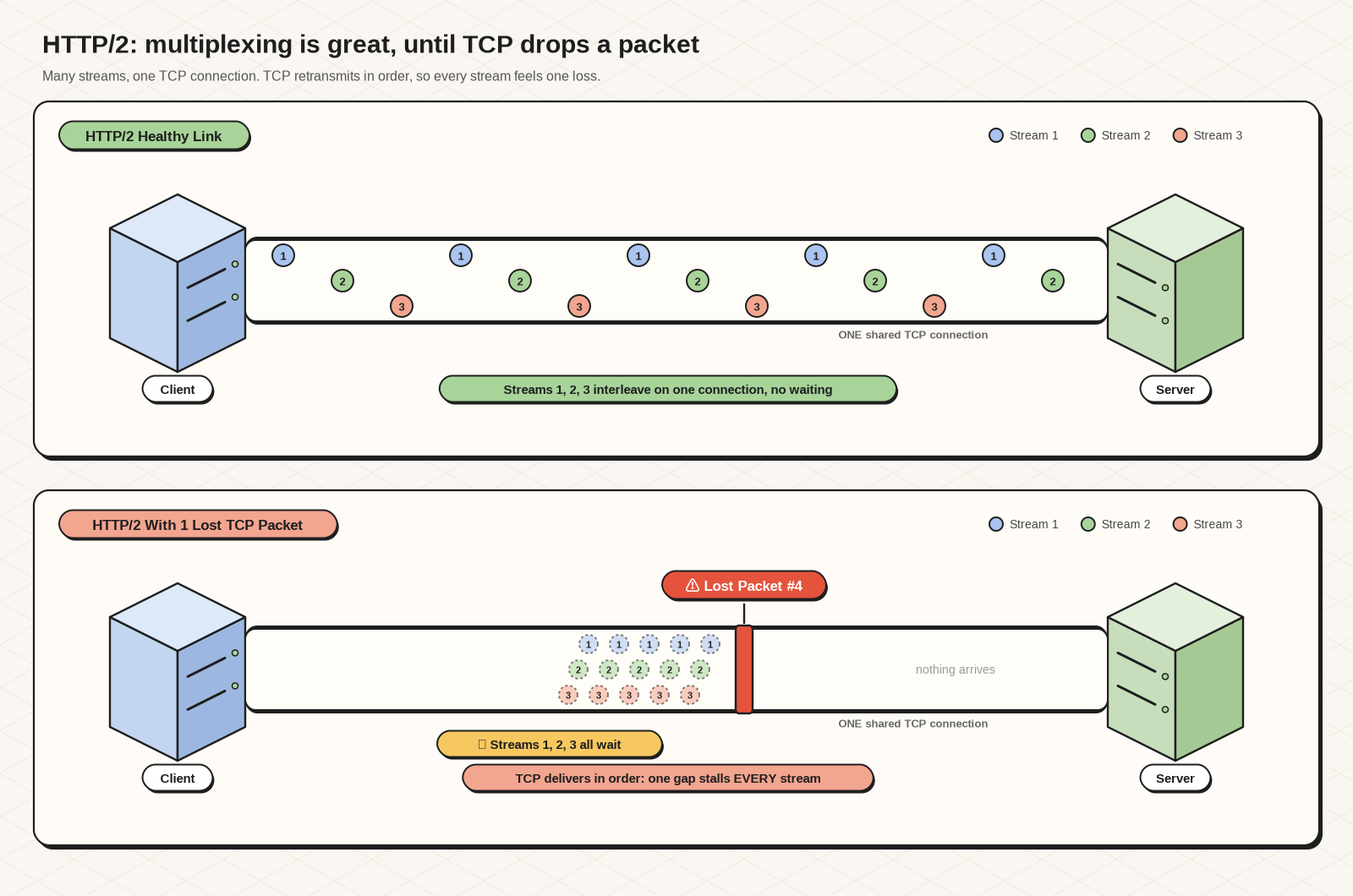
- Binary framing & Multiplexing: Requests and responses are split into small binary frames tagged with a Stream ID. Dozens of requests and responses can interleave simultaneously over a single TCP connection—no more opening 6 connections per domain or hacky domain sharding.
- HPACK header compression: Compresses repetitive headers and maintains a shared header table for the connection, dramatically shrinking request overhead.
- The hidden catch — TCP Head-of-Line Blocking: While HTTP/2 solved HoL blocking at the HTTP layer, TCP still sees one ordered stream of bytes. If a single TCP packet gets dropped on flaky Wi-Fi, the operating system pauses delivery of all HTTP/2 streams on that connection until that lost packet is retransmitted.
Real-World Example
A single-page dashboard loads 60 JS bundles, icons, and REST/GraphQL calls (GET /api/orders, POST /api/metrics) over a single h2 connection. On a fast office connection, all 60 streams fly through concurrently. Put that same user on a train with 2% packet loss, and one dropped TCP packet momentarily freezes every active stream at once.
4. HTTP/3 (h3): Moving to QUIC Over UDP
To eliminate TCP's cross-stream bottleneck, HTTP/3 (RFC 9114) replaces TCP with QUIC (RFC 9000), a modern encrypted transport protocol built on top of UDP:
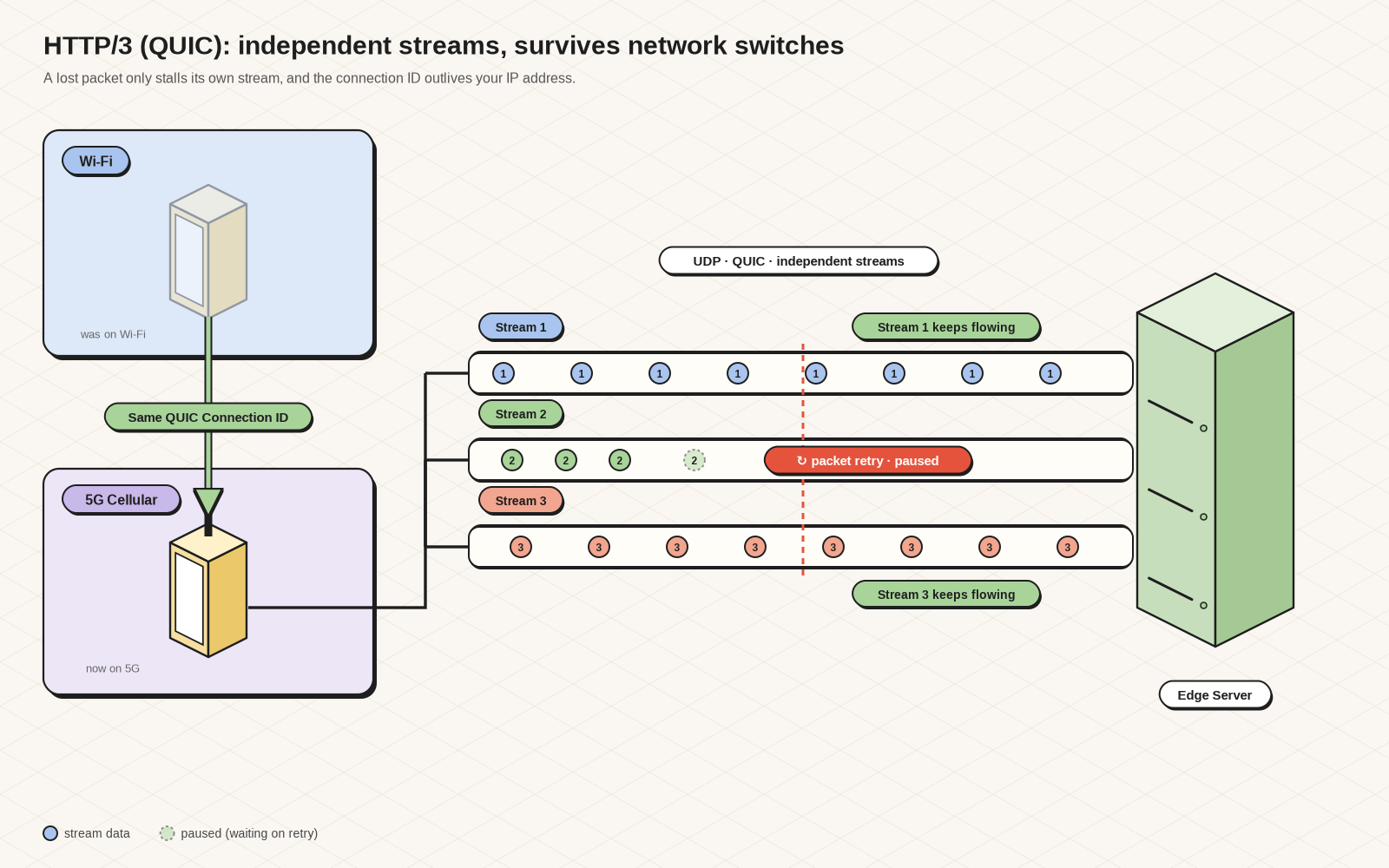
- Truly independent streams: QUIC manages streams natively at the transport layer. If a packet carrying data for Stream 2 is lost, only Stream 2 waits for retransmission—Stream 1 and Stream 3 keep delivering data immediately.
- Faster handshakes with built-in TLS 1.3: TCP + TLS 1.3 requires separate handshakes. QUIC combines transport and cryptographic negotiation into 1 round-trip (1-RTT) for new connections, and 0-RTT when resuming a previous session (usually reserved for safe/idempotent
GETrequests due to replay considerations). - Connection migration: QUIC identifies connections using a Connection ID rather than your IP address + port tuple. When your phone switches from Wi-Fi to 5G as you walk out the door, the connection survives without starting over.
- QPACK header compression: An updated version of HPACK engineered specifically so out-of-order UDP packets never stall header decoding across streams.
How Does the Browser Know h3 Is Available?
Because HTTP/3 runs over UDP port 443 while traditional HTTPS runs over TCP port 443, servers advertise HTTP/3 support using the Alt-Svc (Alternative Service) header on an initial h2 response:
HTTP/2 200
alt-svc: h3=":443"; ma=86400
On subsequent requests, the browser races or switches over to h3—and seamlessly falls back to h2 if a corporate firewall blocks UDP traffic.
Real-World Example
A user scrolls a media-rich feed on Wi-Fi, walks out of a building where Wi-Fi signal drops, and switches to cellular signal. With h3, the active streams migrate smoothly across networks, and occasional packet loss on the elevator ride only delays the specific image or chunk whose packet dropped rather than stalling the entire app.
5. Quick Side-by-Side Comparison
Feature | HTTP/1.1 (http/1.1) | HTTP/2 (h2) | HTTP/3 (h3) |
Underlying Transport | TCP | TCP | QUIC (over UDP) |
Multiplexing | No (6 parallel TCP conns/origin typical) | Yes (over 1 TCP connection) | Yes (independent QUIC streams) |
Transport HoL Blocking | Yes (per connection) | Yes (1 lost TCP packet stalls all streams) | No (only the affected stream waits) |
Header Compression | None (plain text) | HPACK | QPACK |
Encryption (TLS) | Optional (HTTPS adds TLS) | Optional in spec; mandatory in browsers | Built-in (TLS 1.3 mandatory in QUIC) |
Connection Migration | No (breaks on IP change) | No (breaks on IP change) | Yes (survives Wi-Fi <-> 5G switches) |
6. When to Use What: A Practical Guide
In production, browsers and CDNs negotiate the best supported protocol automatically (h3 -> h2 -> http/1.1). Your role as an engineer is deciding what to enable at your edge/ingress and understanding where each protocol shines.
Enable HTTP/3 (h3) when:
- You serve mobile or global users on cellular networks (4G/5G), public Wi-Fi, or high-latency connections where packet loss and network switching are common.
- You sit behind a modern CDN or reverse proxy (Cloudflare, Fastly, AWS CloudFront, Nginx, Envoy, Caddy) where enabling HTTP/3 is mostly configuration plus allowing
UDP/443. - Your frontend makes many concurrent requests and tail latency (
p95/p99) suffers whenever users hit spotty connectivity.
Rely on HTTP/2 (h2) when:
- You want a rock-solid universal baseline for web apps and public APIs. Every modern browser, load balancer, APM tool, and firewall handles
h2reliably. - Your traffic is internal service-to-service (e.g., gRPC or REST microservices) inside a low-loss data center or VPC, where TCP's kernel optimizations and observability tooling are mature and packet loss is near zero.
- Users sit behind restrictive corporate networks that block or throttle
UDP/443(which is why keepingh2enabled alongsideh3is essential).
Use HTTP/1.1 (http/1.1) when:
- You integrate with legacy systems, hardware devices, or older upstream proxies that only speak HTTP/1.1.
- You send simple, low-frequency point-to-point requests (like an occasional webhook or cron job) where multiplexing adds zero practical benefit.
- You are isolating transport issues during debugging, testing whether a stall comes from your application logic or from multiplexing/proxy behavior.
Comments
Join the discussionNo comments yet. Be the first to comment.